


Cyclists Hub is supported by its readers. We may receive a commission if you buy products using our links. All content on Cyclists Hub is written by humans, not robots. Learn More
This guide shows you the most popular ways to mount a bike computer on your bike, from the classic out-front mount to stem, stem cap and aero bar mounts. It covers standard round handlebars and the increasingly popular integrated cockpits, which don’t work with mounts made for round bars. You’ll also learn which mounts come in the box with Garmin and Wahoo computers, which mounts fit which brand, and how to install a bike computer mount. So, without further ado, let’s dive in.
| Mount Type | Pros | Cons |
|---|---|---|
| Out Front Mount | • Excellent visibility • Great aerodynamics • Pro look • Easy install on round bars | • Exposed in crashes • Cable interference possible • Incompatible with integrated cockpits |
| Stem Mount | • Versatile position • Works with bar bags • Cheap and included • Easy replacement | • Harder to see in drops • Less stable • Not aero-friendly |
| Stem Front Mount | • Excellent visibility • Good aerodynamics • Avoids cable issues • Fits non-standard bars | • No integrated cockpit fit • Stem bolt limited |
| Two-Bolt Out-Front | • Excellent visibility • Great aerodynamics • Frees bar space | • Hard to swap between bikes |
| Stem Top-Cap Mount | • Good visibility when riding in a relaxed position | • Low screen position • Limited adjustability • Not aero-friendly |
| TT Handlebar Mount | • Ideal visibility in aero position | • Needs TT bars |
1. Out-Front Mount
The most popular bike computer mount is the out-front mount. It clamps around a round handlebar next to the stem and puts the screen in front of the bar, right in your line of sight. Garmin includes a flush out-front mount with the Edge 1060, Edge 850, Edge 550 and Edge Explore 3, and Wahoo includes an out-front mount with the ELEMNT BOLT 3, ROAM 3 and ACE.
The Garmin out-front mount fits 25.4, 26, 31.8 and 35 mm handlebars. The rubber pads in the box cover the smaller sizes, and 35 mm bars need no pad. The stock Wahoo out-front mount fits 31.8 mm bars only. If you have an integrated cockpit or a handlebar with a non-round or non-standard clamp area, you need a two-bolt out-front mount instead.
Sometimes, you have to tweak the position of your brake and shift cables (check out the stem front mount if you can’t find a way around them). Aside from that, installation is easy. You tighten the screw, twist your bike computer into the mount, and you’re good to go.
If you ride a Wahoo ELEMNT ACE, keep two things in mind. It needs 70 mm of clearance, so it doesn’t fit older Wahoo out-front mounts, and Wahoo recommends mounting it as level as possible (less than 5 degrees of tilt) so its wind sensor reads correctly. Still choosing between the two brands? Check out my Garmin vs. Wahoo comparison.


2. Stem Mount
Stem mounts are versatile because you can attach them to the stem or the handlebar. That also makes them the easiest Garmin mount for flat handlebars on mountain, hybrid and city bikes. Their disadvantage is that the bike computer sits lower and closer to you, so it’s harder to read at a glance. How much that matters depends on your riding position.
Garmin includes a standard mount with every current Edge, and you attach it with two rubber bands. Wahoo includes a zip-tie stem mount with the ELEMNT BOLT 3 and ROAM 3, but sells it separately for the ACE. If you ride a mountain bike with a short stem, Garmin also sells the Edge Mountain Bike Mount.


3. Stem Front Mount (Stem Bolt Mount)
If your shift and brake cables interfere with the out-front mount and there is no way around them, or if your handlebar has a different diameter, the stem front mount is the way to go. It’s also called a stem bolt mount because it attaches using two of the stem faceplate bolts, as you can see in the following pictures. That’s also why it doesn’t fit integrated cockpits. Tighten the bolts to the torque printed on your stem.


4. Two-Bolt Out-Front Mount (Integrated Cockpits)
Owners of integrated cockpits mostly use a two-bolt out-front bike computer mount. It attaches to the underside of the handlebar or stem with two bolts. Wahoo sells integrated handlebar mounts for the ELEMNT BOLT 3, ROAM 3 and ACE. Garmin doesn’t sell one, so Edge owners usually pick a mount from their bike brand or a third-party one such as K-EDGE. As you can see in the pictures below, this setup looks clean, minimalistic and aero.


5. Stem Top-Cap Mount
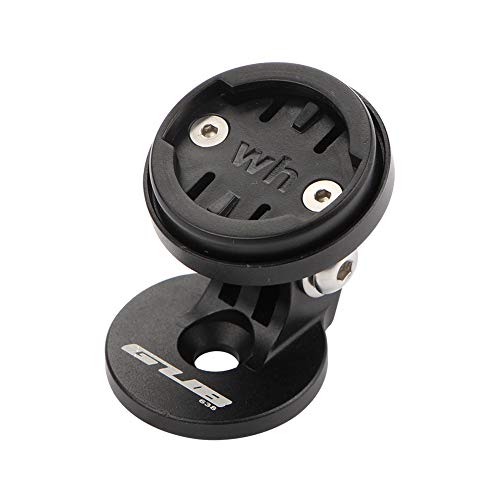
This is the only bike computer mount type I haven’t tried yet. It replaces the stem top cap and uses it as the attachment point, so the bike computer sits right above the stem.
BONUS: 6. TT Handlebar Mount (Aero Bars)
If you’re a time trialist or triathlete, or you just enjoy riding with aero bars, the best choice is a TT handlebar mount. It clamps to one of the extensions, so you can see your bike computer while you stay in the aero position. Garmin’s own Time Trial/Tri Bar Mount fits 22.2 mm extensions.

| Mount | Type | Compatibility | Buy |
|---|---|---|---|
| KOM Cycling Out Front Mount | Out Front Mount | Wahoo | Check Price |
| GUB Stem Top Cap Mount | Top Cap Mount | Wahoo | Check Price |
| Best Tek Stem Front Mount | Stem Front Mount | Wahoo | Check Price |
| Dymoece Two Bolt Out-front Mount | Two Bolt Out-front Mount | Wahoo | Check Price |
| Best Tek Stem Front Mount | Stem Front Mount | Garmin | Check Price |
| Dymoece Two Bolt Out-front Mount | Two Bolt Out-front Mount | Garmin | Check Price |
| K-EDGE Two Bolt Out-front Mount | Two Bolt Out-front Mount | Garmin or Wahoo | Check Price |
| K-EDGE Stem Adjustable Mount | Stem Mount | Wahoo | Check Price |
| Garmin Out Front Mount | Out Front Mount | Garmin | Check Price |
| Garmin TT Bar Mount | TT Bar Mount | Garmin | Check Price |
| Corki TT Mount | TT Bar Mount | Garmin or Wahoo | Check Price |
How to Install a Bike Computer Mount
Installing a bike computer takes a few minutes and usually just a hex key. Here’s how to attach a Garmin Edge, a Wahoo ELEMNT or any other bike computer to your bike:
- Pick the mount that fits your handlebar or stem (see the mount types above).
- For a clamp-on mount, use the rubber pad or shim that matches your handlebar diameter.
- Attach the mount and set the angle so the screen faces you in your usual riding position.
- Tighten the bolts gradually and don’t go over the torque printed on the mount, stem or handlebar, especially on carbon parts.
- Line up the tabs on the back of the bike computer with the mount, press it in and turn it a quarter turn until it locks.
- Fasten the tether. Current Garmin Edge and Wahoo ELEMNT computers come with one.
Summary
When mounting a bike computer on your bike, your options depend on your handlebar. The out-front mount is the most popular and comes in the box with current Garmin and Wahoo computers, but it doesn’t fit integrated cockpits. In that case, you’ll need a two-bolt out-front mount. A stem mount suits flat handlebars and short stems, and a TT mount is the best choice on aero bars.
