


Cyclists Hub is supported by its readers. We may receive a commission if you buy products using our links. All content on Cyclists Hub is written by humans, not robots. Learn More
Yesterday, Wahoo unveiled its new, more affordable smart bike called the KICKR Bike Shift. But how is it different from the current Wahoo KICKR Bike v2? And which one is worth investing in? In this article, you will find out!
KEY TAKEAWAY
The main differences between the Wahoo KICKR Bike, Bike PRO, and Bike Shift are that KICKR Bike and Bike PRO can tilt, while Shift is rigid. KICKR Bike and Bike PRO offer 2500W resistance, while Shift offers only 2200W. On the other hand, SHIFT is more affordable. It has also been completely redesigned, but has no display. Most other specifications are the same.
Wahoo KICKR Bike vs. Bike PRO vs. Shift Comparison
Wahoo KICKR Bike, Bike PRO, or Shift? That’s the question!


The following table summarizes their most important features.
| Feature | Wahoo KICKR Bike v2 | Wahoo KICKR Bike PRO | Wahoo KICKR Shift |
|---|---|---|---|
| Resistance | 2500W | 2500W | 2200W |
| Gradient simulation | 20% | 20% | 20% |
| Entire bike tilt | ✅ | ✅ | ❌ |
| Decline simulation | -15% | -15% | -15% |
| Power accuracy | ±1% | ±1% | ±1% |
| Auto zero | ✅ | ✅ | ✅ |
| Virtual shifting | ✅ | ✅ | ✅ |
| ERG Easy Ramp | ✅ | ✅ | ✅ |
| Odometer | ✅ | ✅ | ✅ |
| Power required | ✅ | ✅ | ✅ |
| Display | ✅ | ✅ | ❌ |
| Flywheel | 13lb / 5.9kg | 13lb / 5.9kg | 13lb / 5.9kg |
| Crank lengths | 165, 167.5, 170, 172.5 and 175mm | 165, 167.5, 170, 172.5 and 175mm | 165, 167.5, 170, 172.5 and 175mm |
| Adjustable fit | Stack, reach, setback, saddle height, frame height | Stack, reach, setback, saddle height, frame height | Stack, reach, setback, saddle height, frame height |
| Metrics | Speed, distance, power, cadence | Speed, distance, power, cadence | Speed, distance, power, cadence |
| Connectivity | ANT+ FEC, Bluetooth, WiFi | ANT+ FEC, Bluetooth, WiFi, KICKR Bridge | ANT+ FEC, Bluetooth, WiFi |
| Weight | 93 lb 42kg | 93 lb 42kg | 79 lb 36kg |
| Weight limit | 250 lb 113 kg | 250 lb 113 kg | 250 lb 113 kg |
| Buy (USA) | Check Price Check Price (tredz.co.uk) | Check Price Check Price (tredz.co.uk) | Check Price Check Price (tredz.co.uk) |
Let me now explain the individual differences below.
Setup and Fit Adjustment
All these smart bikes allow you to adjust stack, reach, setback, saddle height, and frame height. However, their adjustment mechanism differs. KICKR Bike uses quick releases, while Bike PRO and Shift use levers. So it depends on your preference which system you like more, but in my opinion, the levers are more convenient.


They also offer the same crank lengths: 165, 167.5, 170, 172.5, and 175mm. That’s where they have an edge over the Tacx NEO Bike. You can use the crank length that suits you best.


With Bike PRO and Shift, you should not encounter an issue with your inner thighs rubbing against the frame, as the frame has a slimmer profile.
Wahoo KICKR Bike PRO has now flared handlebars (16-degree flare, 40cm width) to improve ergonomics. They might take some time to get used to, but I believe they will be better for most people.
Gradient & Decline Simulation
Wahoo KICKR Bike, PRO, and Shift offer a 20% gradient simulation. However, they can’t simulate declines like the Tacx NEO Bike and NEO Bike Plus.
This gradient is difficult enough for most people, so some apps like Zwift halve the difficulty by default. This means that the gradient will feel like 10%, not 20%.
However, you can turn this feature off and “enjoy” suffering in the form of super steep gradients.


The most significant difference between the KICKR Bike and PRO vs. Shift is that the Shift can’t tilt. This tilt on the KICKR Bike and PRO is controllable via buttons on the hoods or third-party apps.

This feature makes riding the KICKR Bike and PRO more engaging and fun because the entire bike tilts when you start climbing (or descending). The effect is also more realistic than with Wahoo CLIMB or Elite RIZER, thanks to the center pivot point (the same center point as riding outside). CLIMB and RIZER use the rear wheel as the center point.
However, remember that tilt only works in free riding, not when doing structured workouts.
Shifting and Gearing
All these smart bikes use virtual gears, which you can customize (the number of teeth and sprockets).


Wahoo KICKR Bikes use Shimano-like shifters, so they feel intuitive. Additionally, you can use the Wahoo app to configure the behavior of Shimano, SRAM, or Campy components.
Third-party Apps Compatibility and Controllability
All these smart bikes are compatible with leading indoor cycling apps like Zwift, ROUVY, TrainerRoad, and more. They use ANT+ FEC and Bluetooth connectivity and are controllable via mobile and desktop apps or cycling computers.
Furthermore, they have WiFi to download firmware updates and save you some precious Bluetooth ports.
The main difference here is that the Bike PRO has a KICKR Bridge, meaning that it can relay the ANT+/BLE sensors over Wi-Fi, simplifying connections and saving some ports. This is helpful mainly for Apple TV users.
Practicality
From a practical standpoint, the KICKR Bike and Bike PRO get more points. That’s just because they have a handy display showing ride info like power or cadence, but mainly the used gear.
Shift doesn’t have a display so that you might miss it. Luckily, indoor cycling apps now show virtual gears. And of course, all bikes have at least one USB port for recharging your devices.

The Bike PRO has also refined touchpoints. It has a better saddle (Fizik Aliante R5) and bartape (Fizik Solocush), to make it more comfortable to ride. It also has more buttons directly on the hoods to allow you to use the in-app functionalities, like Zwift’s Power Ups.
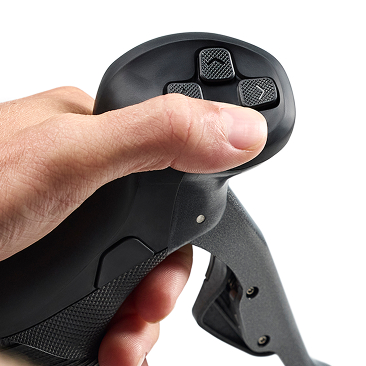
Winner: Wahoo KICKR PRO and Shift
Ride Realism
I have not yet been able to try these smart bikes side by side. However, despite the different technologies used, I guess their ride feel will be similar.
Remember, neither KICKR Bike nor Shift can simulate different riding surfaces (cobbles, gravel, etc.) like NEO Bike (NEO Bike Plus).
Winner: It’s a draw
Rider’s Weight Limit
The Wahoo KICKR Bike, Bike PRO, and Shift rider’s weight limits are the same: 250 lb (113 kg).
Price
The Wahoo KICKR Bike and Bike PRO are $1000 (€1000) more expensive than the Wahoo KICKR Shift. It costs $3999.99, making it one of the most expensive pieces of indoor cycling equipment you can buy. Wahoo KICKR Shift retails for $2999.99.
Naturally, the question is:
Are the Wahoo KICKR Bike, Bike PRO, or Shift worth it?
They are more than twice as expensive as most high-end smart bike trainers. So, isn’t it just better to put your bike into a bike trainer or buy a used bike and a smart trainer?
Well, as always, it depends. Smart bikes are more sophisticated, creating an ultimate platform for indoor training. One of the biggest benefits of smart bikes is that they are super quiet, so you won’t disturb your household members.
They allow for easy fit adjustments. So, for example, if you have a partner who also wants to train indoors, you can adjust the fit. They are also suitable for beginners who don’t have a bike or a bike trainer because smart bikes are an “out of the box” solution.
So, although smart bikes are costly, their price is justifiable for a certain group of people. At this point, you should already have a clear idea of whether they suit you.
Summary
Choose the Wahoo KICKR Bike PRO if you want to experience more “fun” thanks to the tilt feature. The entire smart bike can tilt itself depending on the gradient you ride in an indoor cycling app.
Wahoo KICKR Shift doesn’t have this feature or a display. It also has a 300W lower maximum resistance (which is honestly irrelevant) but costs $1000 less.
I would go for Shift. $1000 is a lot of money you can spend otherwise (here are some cool road bike upgrades).
Do you agree with my conclusion? If not, why? Let me know in the comments below.
Wahoo KICKR Bike vs. PRO vs. Shift FAQ
Explore More From Indoor Cycling Content
Apps
Best Indoor Cycling Apps
Zwift Review
ROUVY Review
TrainerRoad Review
Wahoo SYSTM Review
MyWhoosh Review
FulGaz Review
Kinomap Review
TrainingPeaks Virtual Review
Bike Trainers & Rollers
Best Bike Trainers
Best Smart Bike Trainers
Best Budget Bike Trainers
Best Bike Trainers for Zwift
Best Bike Rollers
Best Bike Trainer Brands
Best Fluid Bike Trainers

Maybe important to mention, if you always use workouts in Zwift instead of riding freely, the tilt function of the Kickr Bike doesn’t work anyway. And gears, etc also don’t really play a role as Zwift will be setting your power and the cadence you can read on the screen. So for people who use the bike for structured workouts, the $1000 is definitely not worth it.
I don’t think I would pay $1000 just for a bike that tilts back and forwards. That said the new Pro comes with a premium saddle and bars. From what I’ve read if you use it a lot you would a least want to upgrade the saddle. The additional buttons on the shifters would also be nice to have. What I am most curious about is the difference in the drive system where the Pro is motorized and the shift is not. I would like to hear more about this.
Hi,
I didn’t have the time to check out the Pro more, but I will in the following days and update this comparison.
– Petr